
Timestamp Camera Pro
Bian DiVideo Players & Editors
4.4339.00 Reviews
- Version
- Varies With Device
- Installs
- 100.00K
- Age Rating
- Everyone
Screenshots
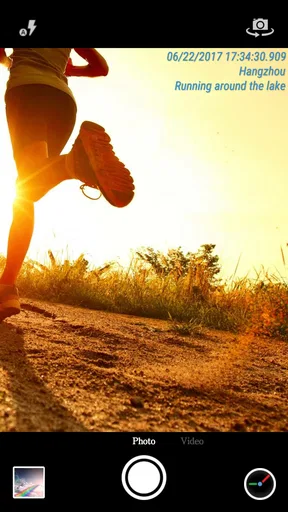
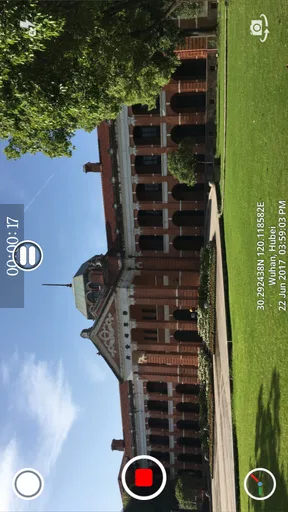
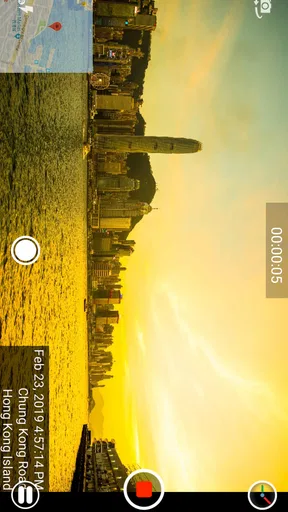
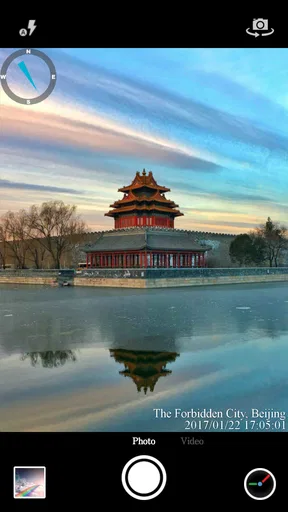
Our Review of Timestamp Camera Pro
 Analysis by Appyee
If you're anything like me and love capturing every moment with precision, then Timestamp Camera Pro might just be your new best friend. I've been tinkering with it for a bit, and let me tell you, it's got some pretty neat features. Let’s dive into what makes this app stand out.
Starting with the moment you need to document
I reach for a timestamp camera when an ordinary photo is not enough: I want the date and time visible in the image itself, not just tucked away in a phone’s photo details. That can matter when I am keeping a record of a delivery, documenting a repair, noting the progress of a home project, or sorting pictures from a trip later. Timestamp Camera Pro is a paid camera app from Bian Di in the video players and editing category, and its central purpose is to put date and time information onto photos and videos.
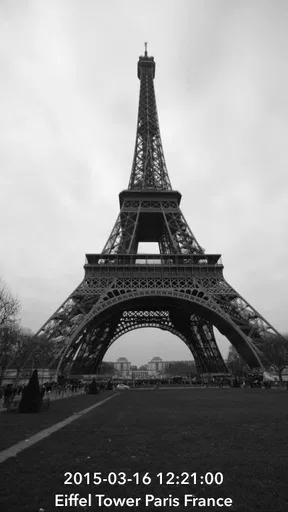
For a simple travel snapshot, a timestamp may be unnecessary decoration. For a sequence of pictures that needs to make sense outside my camera roll, it can save a later round of guesswork. The important distinction is that the time becomes part of the visible image, so someone viewing a copy can read it without opening a separate information panel. That convenience also means I think about placement and legibility before I start, rather than treating the mark as something I can always remove later.
First Impressions and User Interface
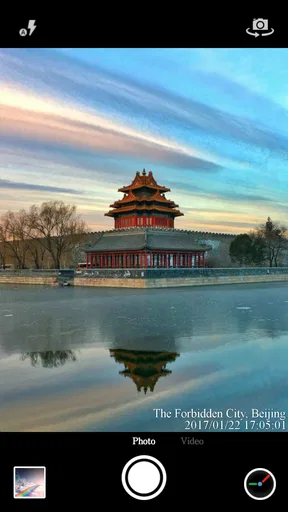
When I first opened Timestamp Camera Pro, I was greeted by a clean and straightforward interface. Honestly, there’s nothing worse than an app cluttered with unnecessary options. Thankfully, this one keeps it simple, allowing you to focus on the task at hand: capturing stunning photos and videos with accurate timestamps.
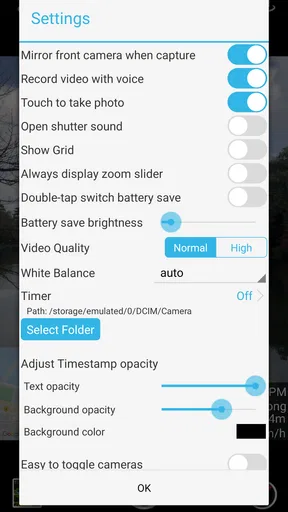
The design is intuitive, which means you don't need to be a tech wizard to navigate through it. Everything is pretty much where you'd expect it to be, from the camera settings to the various timestamp options. I could easily switch between modes and customize my settings without any hassle.
Features That Stand Out
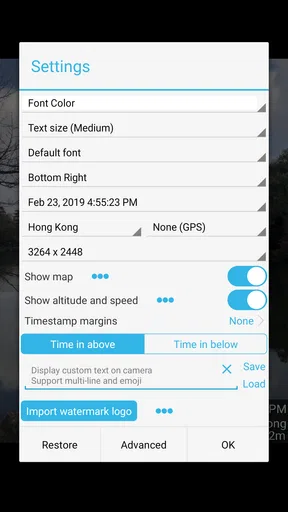
Alright, let's talk features. This app isn't just about slapping a generic timestamp on your photos. Oh no, it goes far beyond that. You can customize the date and time format to suit your style or requirements. Whether you want a full date and time, just the time, or even a custom text, it’s all possible. And the best part? You can change the font size and color to make it pop or blend in, depending on your mood.
An interesting feature I stumbled upon is the ability to add a GPS location tag. For those of us who love to capture travel moments, this is a game-changer. You can automatically embed your location on your photos, which is super handy for travel bloggers or anyone who likes to keep their memories organized geographically.
A practical capture-to-share routine
My most useful approach is to prepare one clear timestamp style for a particular job, then leave it alone while I take the whole set. For example, if I am photographing a leaky tap before and after tightening a fitting, I would choose a date-and-time format that stays readable against both the dim cabinet and the brighter sink. I would frame each shot with a little spare space near the edge, because a timestamp that lands over a valve, label, or important crack can make the evidence harder to interpret.
That small bit of planning matters more than adding extra decoration. A pale mark may disappear against a sunlit wall, while a bold one can compete with the subject. I treat the timestamp as part of the composition: check the position on a test image, review it against a light and a dark background, then start the actual sequence. If the app offers the choice of text styling described above, a restrained size and strong contrast are usually more useful for records than a large, attention-grabbing stamp.
After capture, the workflow changes from taking pictures to handing them off. I would review the images before sending them to a landlord, contractor, colleague, or family member, making sure the timestamp is visible and the subject is still clear. A stamped image is easy to understand at a glance, but it is not a substitute for a carefully named folder or a short note explaining what the photo shows. For a multi-step repair, I would pair the pictures with a simple sequence such as “before,” “during,” and “after,” rather than expecting the time alone to tell the whole story.
For video, I would use the same principle but be more cautious about framing. A mark that looks unobtrusive in a still can distract when it remains on screen throughout a clip. Before recording something that matters, I would make a brief test and watch it back, checking that the timestamp does not cover the action or a detail I need to show. That is a useful habit for documenting a process, but less appealing for a polished personal video where a permanent overlay may draw attention away from the scene.
Performance and Reliability
Now, I've tried a fair share of similar apps in the past, and many tend to lag or crash, especially during video recording. With Timestamp Camera Pro, I experienced none of that. The app runs smoothly, even when recording high-resolution videos. It maintains quality without compromising on speed, which is something I genuinely appreciate.
The timestamps are perfectly synchronized with the actual time, so there's no worrying about discrepancies between what's displayed and the actual moment captured. This level of reliability makes it a trusted tool for professionals who need precise documentation.
Even with a smooth capture experience, I would not make a single phone the only record for something consequential. If a photo is being used to explain a safety issue, a property condition, or a work milestone, I would keep the original files organized and add written context where needed. Visible date and time can help establish order, but they do not explain what happened between frames, and a timestamp by itself should not be treated as proof of every detail surrounding a moment.
It is also worth deciding whether the recipient needs the stamped image or the clean original. A permanent overlay is convenient when someone must understand the timing immediately, yet it can be inconvenient if the same picture later needs to be cropped, printed, or used in a presentation. I would keep an unstamped version separately when the image may have a second use. This is not a flaw unique to this app; it is the trade-off built into putting information directly onto a photo or video.
Customization and Personal Touch
One of the things I love most is the level of customization this app offers. Whether you want to adjust the transparency level of your timestamps or choose from a variety of position settings, it allows for a personal touch that makes each photo unique.
You're not limited to just photos, either. The app lets you timestamp videos with the same level of detail and customization. Plus, with the option to add logos or watermarks, it’s perfect for those who need to maintain brand consistency in their media.
Choosing the right tool for the handoff
Compared with the usual alternatives, this approach saves a step: rather than taking a picture with the standard camera and adding a date later in an editor, the visible information is part of the capture workflow. That is handy when I need a batch of clearly marked images quickly, or when I want the same style across a set. A regular camera app is a better choice if I want the cleanest original and only occasionally need a date; I can then add text to selected pictures afterward instead of marking every shot.
A separate editing app can offer more control over a finished design, especially if I need to position text precisely for a poster or social post. But that adds another handoff: capture, find the files, edit them, and export copies. Timestamp Camera Pro makes more sense when the record itself is the goal and speed matters more than elaborate graphic treatment. I would skip it if I rarely need visible dates, dislike permanent overlays, or mainly record footage intended to look cinematic.
The app is listed at $4.99, so I would weigh that cost against how often I expect to use timestamped media. For someone regularly documenting site visits, inventory, repairs, or travel stops, a dedicated capture tool can earn its place by reducing repetitive editing. For an occasional family photo, the built-in camera is likely enough. Its Everyone age rating also makes it broadly suitable from a content standpoint, though the practical value still depends on whether the person taking the pictures needs this particular workflow.
When location is included, I would be selective about where I share the result. A place label can help me remember a viewpoint or organize travel photos, but it may reveal more than I want when an image is posted publicly or sent beyond its intended audience. For a private trip archive, location can be useful; for a picture of my home or a child’s routine, I would consider leaving it out. That choice is part of using a location-marked image responsibly, not just making it look tidy.
Where the workflow can falter
The main friction is permanence. Once the timestamp is visibly baked into an image, I cannot simply toggle it off for that copy if I change my mind. A poor color choice, awkward placement, or incorrect device time can make an otherwise useful picture less convincing. I would check the phone’s clock and take a trial shot before a long recording or an important documentation session, then inspect the result rather than assuming the overlay will suit every scene.
Another limitation is visual clutter. A date, time, custom text, location, and logo may each be useful on their own, but stacking labels can compete with the subject and make a frame harder to read. For a small item such as a meter reading or a damaged screw, I would favor a close, clear image and only the information that helps identify it. If the objective is to show detail, an elaborate watermark can work against the evidence the photo is meant to preserve.
There is also a difference between a convenient timestamp and a dependable recordkeeping system. The app can make the time visible, but I would still use clear filenames, keep related images together, and write down the project or location when the context is not obvious. For work that requires formal documentation or a controlled audit trail, I would use the process required by that organization rather than assuming a camera overlay alone meets it.
Who will get the most from it
I see the strongest fit for people who repeatedly need time-marked visuals: contractors tracking stages of a job, people keeping a household repair record, travelers labeling stops, or small businesses sharing dated progress pictures. A practical everyday example is a parcel that arrives with visible damage. I could photograph the unopened package, the affected area, and the contents after opening, then send the sequence to the seller with the timing plainly visible. The images would be easier to follow than a scattered set of ordinary camera photos, although a short message would still be needed to explain the issue.
It is less compelling for someone who values unaltered-looking photos, wants to choose timestamps only after shooting, or mostly makes videos for creative editing. In those cases, the ordinary camera plus a later editor gives more flexibility and avoids stamping every capture. I would also be cautious about using it for a scene where an overlay could cover a key detail: take a clean image with another camera workflow if preserving the unobstructed frame is the priority.
The product has been available since March 19, 2015, and its audience response is reflected in an average rating of 4.4 from around 6,200 ratings, with over 100,000 installs. I take those figures as a sign that the idea has found a real audience, not as a guarantee that it suits every phone or every task. The developer, Bian Di, has focused this app on a narrow, practical job, and that focus is its appeal: it is not trying to replace a full video editor or general camera app.
Final Thoughts
Wrapping it up, Timestamp Camera Pro is a versatile and reliable app that delivers on its promise. It's particularly useful for those who need accuracy and customization in their media timestamps. Whether you’re a professional, a traveler, or just someone who loves capturing moments, this app has something to offer.
Sure, there are other apps out there, but the combination of features, usability, and performance makes this one a standout choice. So, if you haven't already, give it a shot and see how it fits into your digital storytelling toolkit. Trust me, you won't be disappointed!
Verdict
Strengths of Timestamp Camera Pro
- Highly customizable timestamp options.
- Supports various video resolutions.
- User-friendly interface design.
- Real-time location watermarking.
- Frequent updates and enhancements.
Limitations of Timestamp Camera Pro
- Limited free version features.
- No built-in photo editing tools.
- Occasional GPS inaccuracies.
- Consumes significant battery power.
- Lacks cloud backup integration.
Other Releases by Bian Di
View All
Timestamp Camera
Photography4.6
Similar Picks in This Category
View All
Google TV
Google LLC3.9

iTunes
Apple4.7

YouTube
Google LLC3.8

MX Player
Amazon Mobile LLC4.2

CapCut - Video Editor
Bytedance Pte. Ltd.3.5

PLAYit-All in One Video Player
PLAYIT TECHNOLOGY PTE. LTD.4.5
Frequently Asked Questions
What features does Timestamp Camera Pro offer?
Timestamp Camera Pro provides a variety of features including the ability to add timestamps to photos and videos, customizable date and time formats, and options to include GPS location. Users can choose from various fonts and text sizes to personalize their stamps, making it ideal for documenting important events or projects.
Is Timestamp Camera Pro user-friendly for beginners?
Yes, Timestamp Camera Pro is designed with user experience in mind. Its intuitive interface allows users to easily navigate through settings and customize their timestamps without hassle. Even those new to photo editing or timestamping will find the app straightforward and easy to use.
Can I use Timestamp Camera Pro offline?
Yes, Timestamp Camera Pro can be used offline. You can take photos and videos with timestamps without an internet connection. However, features like GPS location stamping may require internet access to function accurately depending on your device settings.
Does Timestamp Camera Pro support video recording with timestamps?
Absolutely! Timestamp Camera Pro supports video recording with timestamps. Users can apply the same customization options for fonts, sizes, and formats to videos as they do with photos, ensuring a consistent and professional look across all media.
Is there a difference between the free and Pro versions of the app?
The Pro version of Timestamp Camera offers advanced features such as higher quality output, additional customization options, and removal of ads. While the free version provides basic timestamp capabilities, the Pro version enhances user experience with more robust and flexible functionalities.
